# Hugging Face Hub
## Why share to the Hugging Face Hub
The Hub is a central platform where anyone can share and explore models,
datasets, and ML demos. It aims to build the most extensive collection
of Open Source models, datasets, and demos.
Sharing to the Hub could amplify the impact of a fastai
[`Learner`](https://docs.fast.ai/training/learner.html#learner) by
making it available for others to download and explore.
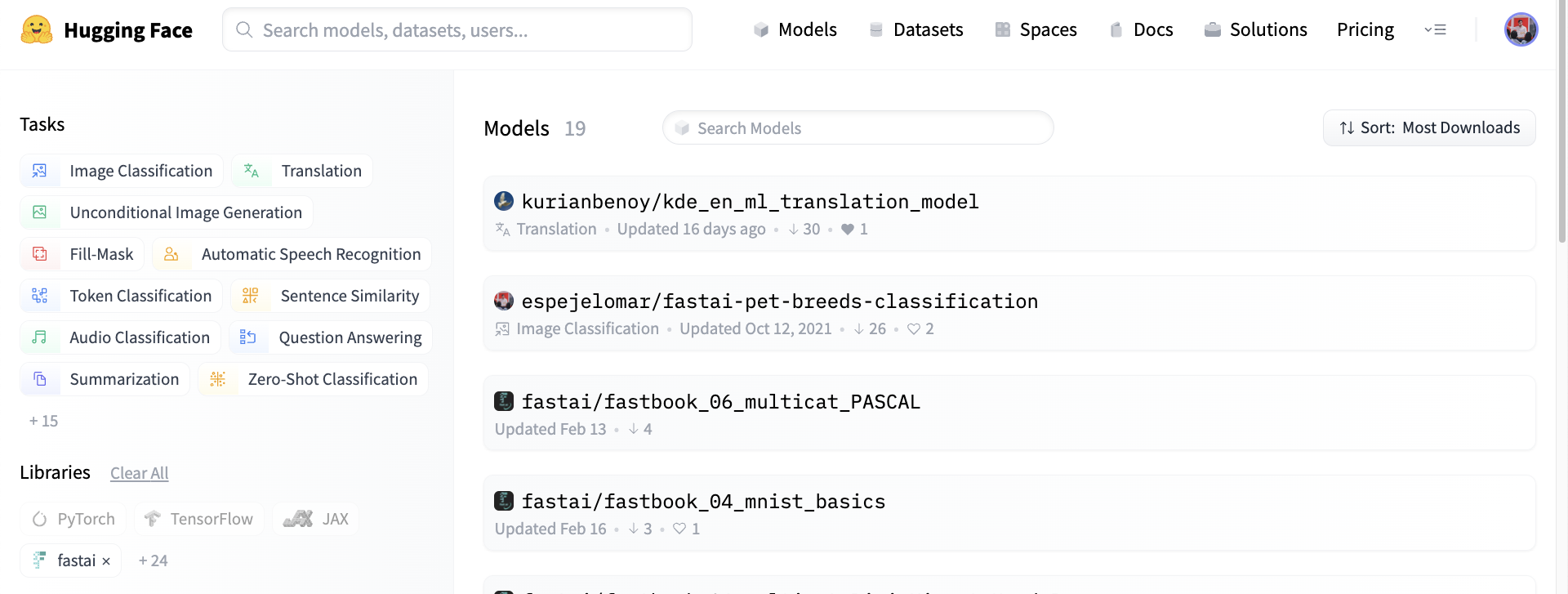
Anyone can access all the fastai models in the Hub by filtering the
[huggingface.co/models](https://huggingface.co/models) webpage by the
fastai library, as in the image below.
 The Hub has built-in [version control based on
git](https://huggingface.co/docs/transformers/model_sharing#repository-features)
(git-lfs, for large files), discussions, [pull
requests](https://huggingface.co/blog/community-update), and [model
cards](https://huggingface.co/docs/hub/model-repos#what-are-model-cards-and-why-are-they-useful)
for discoverability and reproducibility. For more information on
navigating the Hub, see [this
introduction](https://github.com/huggingface/education-toolkit/blob/main/01_huggingface-hub-tour.md).
## Installation
Install `huggingface_hub`. Additionally, the integration functions
require the following packages:
- toml,
- fastai\>=2.4,
- fastcore\>=1.3.27
You can install these packages manually or specify `["fastai"]` when
installing `huggingface_hub`, and your environment will be ready:
pip install huggingface_hub["fastai"]
To share models in the Hub, you will need to have a user. Create it on
the [Hugging Face website](https://huggingface.co/join).
## Sharing a [`Learner`](https://docs.fast.ai/training/learner.html#learner) to the Hub
First, log in to the Hugging Face Hub. You will need to create a `write`
token in your [Account Settings](http://hf.co/settings/tokens). Then
there are three options to log in:
1. Type `huggingface-cli login` in your terminal and enter your token.
2. If in a python notebook, you can use `notebook_login`.
from huggingface_hub import notebook_login
notebook_login()
3. Use the `token` argument of the `push_to_hub_fastai` function.
Input `push_to_hub_fastai` with the
[`Learner`](https://docs.fast.ai/training/learner.html#learner) you want
to upload and the repository id for the Hub in the format of
“namespace/repo_name”. The namespace can be an individual account or an
organization you have write access to (for example, ‘fastai/stanza-de’).
For more details, refer to the [Hub Client
documentation](https://huggingface.co/docs/huggingface_hub/main/en/package_reference/mixins#huggingface_hub.push_to_hub_fastai).
``` py
from huggingface_hub import push_to_hub_fastai
# repo_id = "YOUR_USERNAME/YOUR_LEARNER_NAME"
repo_id = "espejelomar/identify-my-cat"
push_to_hub_fastai(learner=learn, repo_id=repo_id)
```
The [`Learner`](https://docs.fast.ai/training/learner.html#learner) is
now in the Hub in the repo named
[`espejelomar/identify-my-cat`](https://huggingface.co/espejelomar/identify-my-cat).
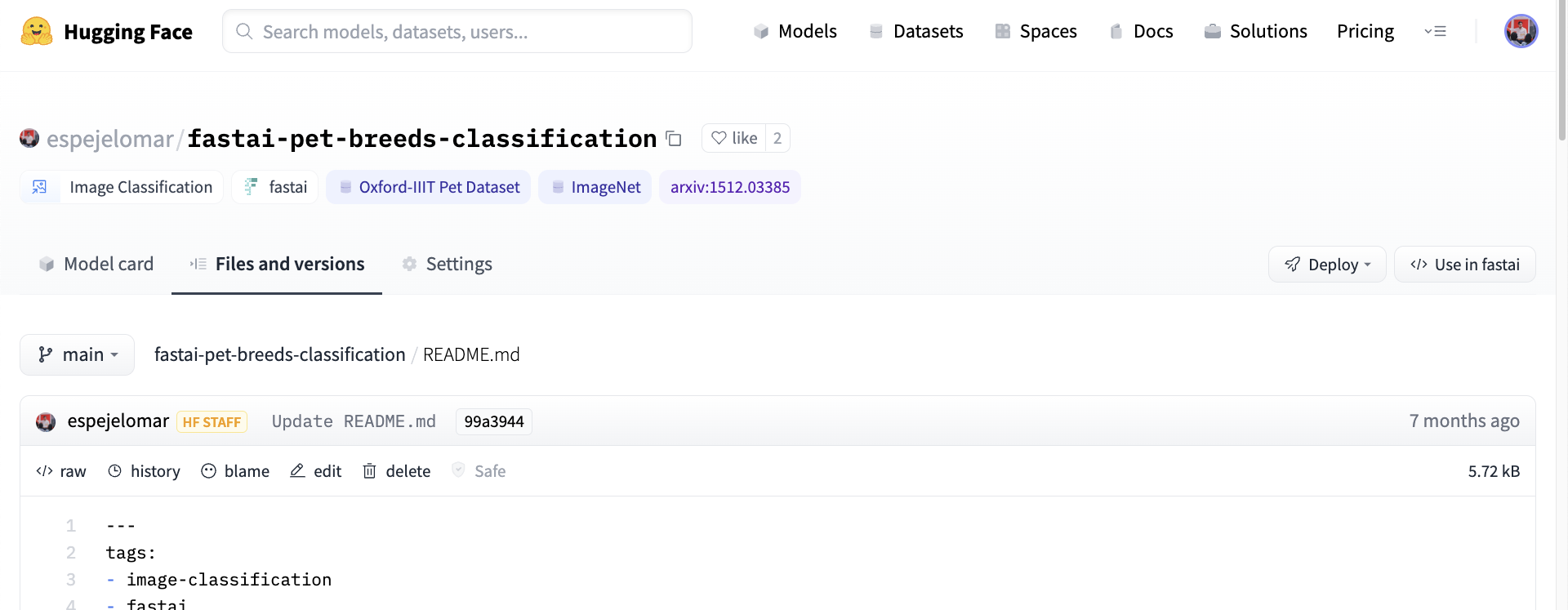
An automatic model card is created with some links and next steps. When
uploading a fastai
[`Learner`](https://docs.fast.ai/training/learner.html#learner) (or any
other model) to the Hub, it is helpful to edit its model card (image
below) so that others better understand your work (refer to the [Hugging
Face
documentation](https://huggingface.co/docs/hub/model-repos#what-are-model-cards-and-why-are-they-useful)).
 `push_to_hub_fastai` has additional arguments that could be of interest;
refer to the [Hub Client
Documentation](https://huggingface.co/docs/huggingface_hub/main/en/package_reference/mixins#huggingface_hub.from_pretrained_fastai).
The model is a [Git
repository](https://huggingface.co/docs/transformers/model_sharing#repository-features)
with all the advantages that this entails: version control, commits,
branches, [discussions and pull
requests](https://huggingface.co/blog/community-update).
## Loading a Learner from Hub
Load the [`Learner`](https://docs.fast.ai/training/learner.html#learner)
we just shared in the Hub.
``` py
from huggingface_hub import from_pretrained_fastai
# repo_id = "YOUR_USERNAME/YOUR_LEARNER_NAME"
repo_id = "espejelomar/identify-my-cat"
learner = from_pretrained_fastai(repo_id)
```
The [Hub Client
documentation](https://huggingface.co/docs/huggingface_hub/main/en/package_reference/mixins#huggingface_hub.from_pretrained_fastai)
includes addtional details on `from_pretrained_fastai`.